HASSELBLAD DIGITAL CAMERAS

text & images | © darlene almeda
HASSELBLAD 907X 50c + 45P LENS & ACCESSORIES

TLDR: Hasselblad 907x 50c

⚡ TLDR: Hasselblad 907x 50c
* 50MP CFV II 50C digital back with modern CMOS sensor
* Attaches to vintage Hasselblad V bodies and technical cameras
* Supports automatic exposure, bracketing, and Live View
* Compact form benefits from a grip or wrist strap for handling
* Pairs seamlessly with XCD lenses and legacy V-system glass
* My current kit: XCD 28P, 45P, and 75P lenses
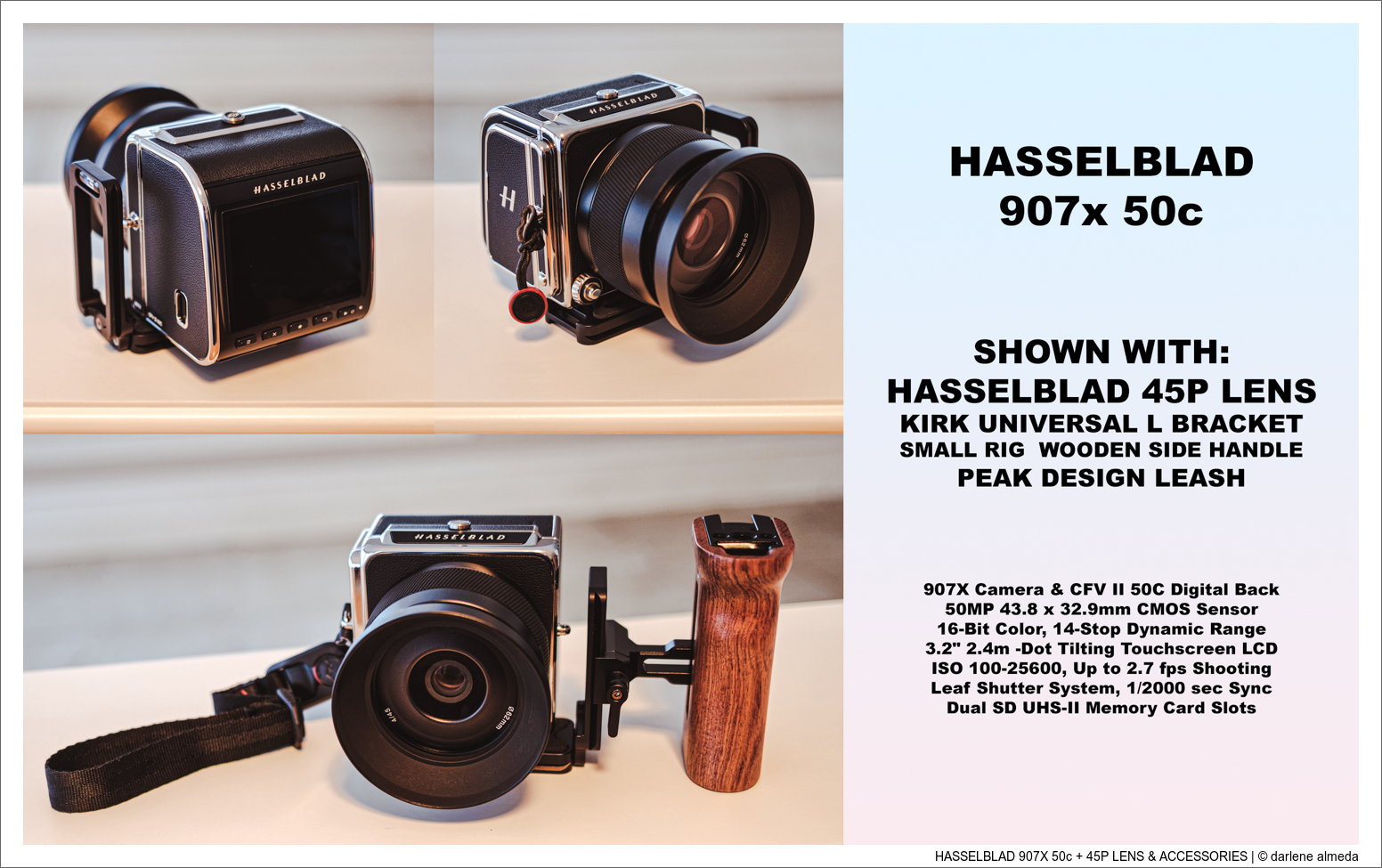
* Preferred setup: Kirk L-Bracket + SmallRig wooden side handle + Peak Design wrist strap

The Hasselblad 907x 50c draws inspiration from the iconic Hasselblad 500 series while incorporating modern digital capture. Its 50-megapixel CFV II 50C digital back seamlessly attaches to 500-series film bodies and, with a flash sync cable, to technical cameras as well. When paired with the 907x body and XCD lens, it autofocuses as well. It offers photographers automatic exposure, bracketing functions, and streamlined operation—features that blend classic design with modern usability.

Despite its compact size, the 907x benefits from a grip or strap for comfortable handling. I secure mine with a wrist strap, which works well for my shooting style. When cradled in the hands, it handles similarly to a 500-series body equipped with a waist-level finder, maintaining that familiar Hasselblad feel.

I originally acquired the 907x specifically for use with the CFV II 50C, replacing my earlier CFV50c. Later, I added the XCD 45P lens to explore the potential of the native XCD system. The pairing proved seamless, and I’ve successfully used this setup handheld for street-style photography with excellent results. Now in 2025, I have completed a three-lens XCD “P” kit—the 28, 45, and 75—which should serve me well for quite some time.

Hasselblad offers a dedicated Control Grip, but I chose a different solution. As shown above, I use the Kirk Universal L-Bracket paired with a SmallRig Wooden Side Handle. For most of my cameras, including the 907x, I rely on the Peak Design Wrist Strap, which provides secure handling without adding bulk.

907x 100c

TLDR: Hasselblad 907x 100c

⚡ TLDR: Hasselblad 907x 100c
* 100MP BSI CMOS medium-format sensor
* 16-bit color depth with approximately 15 stops of dynamic range
* Modular design pairs with XCD lenses or adapted V-system lenses
* Tilting rear touchscreen for waist-level shooting
* Emphasizes precision and image quality over speed or automation
* No IBIS, high-FPS bursts, or video-centric features
* Best suited for deliberate, high-resolution still photography

The 907x 100c is a modern medium-format digital camera that combines Hasselblad’s design heritage with today’s resolution and color fidelity. At its core is a 100-megapixel BSI CMOS sensor delivering 16-bit color depth and approximately 15 stops of dynamic range. The result is exceptional detail and tonal richness, well-suited for large-format printing and high-end commercial applications.

The design pays direct homage to Hasselblad’s classic V-series cameras. The slim 907x body pairs with the CFV 100c digital back to form a fully modular system that can be used with native XCD lenses or adapted for legendary V-system glass. Its tilting rear touchscreen supports waist-level shooting, closely echoing the experience of working with film Hasselblads while providing all the benefits of modern digital capture.

Unlike many contemporary digital cameras that emphasize speed and automation, the 907x 100c is built around precision and craftsmanship. It does not offer high-frame-rate burst shooting, in-body image stabilization, or video-centric features. Instead, it encourages a slower, more deliberate working method—ideal for photographers who value intentional image-making and want the highest possible image quality straight from the camera.

907x STITCHING SETUP

TLDR: Hasselblad 907x Stitching Setup

⚡ TLDR: Hasselblad 907x Stitching Setup
* Primary support: RRS Series 1 Tripod + Acratech Pano Head & Leveling Base
* Secondary head: FotoPro Eagle 6 gimbal-style head
* Supports both 907x (with Kirk L-Bracket) and ALPA TC
* ALPA TC’s square format eliminates camera rotation during stitching
* 907x preferred for stitching due to auto exposure, e-shutter, and bracketing
* ALPA TC used with 100 mm & 180 mm lenses due to lighter weight and longer lens support
* Longest native 907x lens in current use: 75P
HASSELBLAD 907X + XCD 45/4 P + STITCHING SETUP

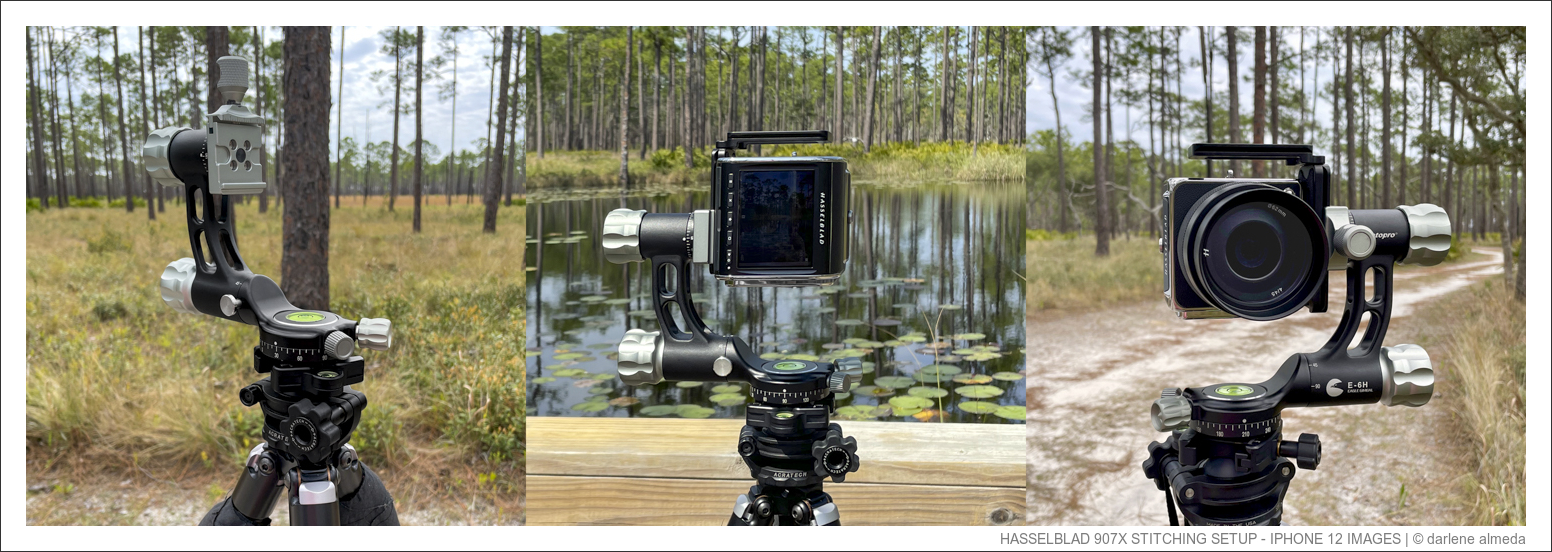
When capturing stitched landscapes on clear, wind-free days, I rely on a proven panoramic support setup: an RRS Series 1 tripod paired with an Acratech Panoramic Head and Leveling Base, complemented by a FotoPro Eagle 6 gimbal-style head, as shown above.

This configuration supports both my 907x, fitted with a Kirk Universal L-Bracket, and my ALPA TC, which features a dedicated attachment shoe, allowing me to switch between systems as needed.

Because the ALPA TC is a square-format camera, it eliminates the need to change camera orientation when stitching. The digital back can simply be attached in either landscape or portrait orientation, which simplifies alignment and workflow.

While I have successfully used this stitching setup with my Hasselblad 500-series film bodies, I generally prefer the 907x for stitching due to its automatic exposure, electronic shutter, and bracketing capabilities. However, when I choose to stitch with the 100 mm or 180 mm lenses, I use the ALPA TC instead—both for its lighter weight compared to the 500-series bodies and because no comparable long lens currently exists for the 907x. I am uncertain whether I will ever add a longer lens to the 907x system; at present, my longest native lens, the 75P, is working well for stitching.

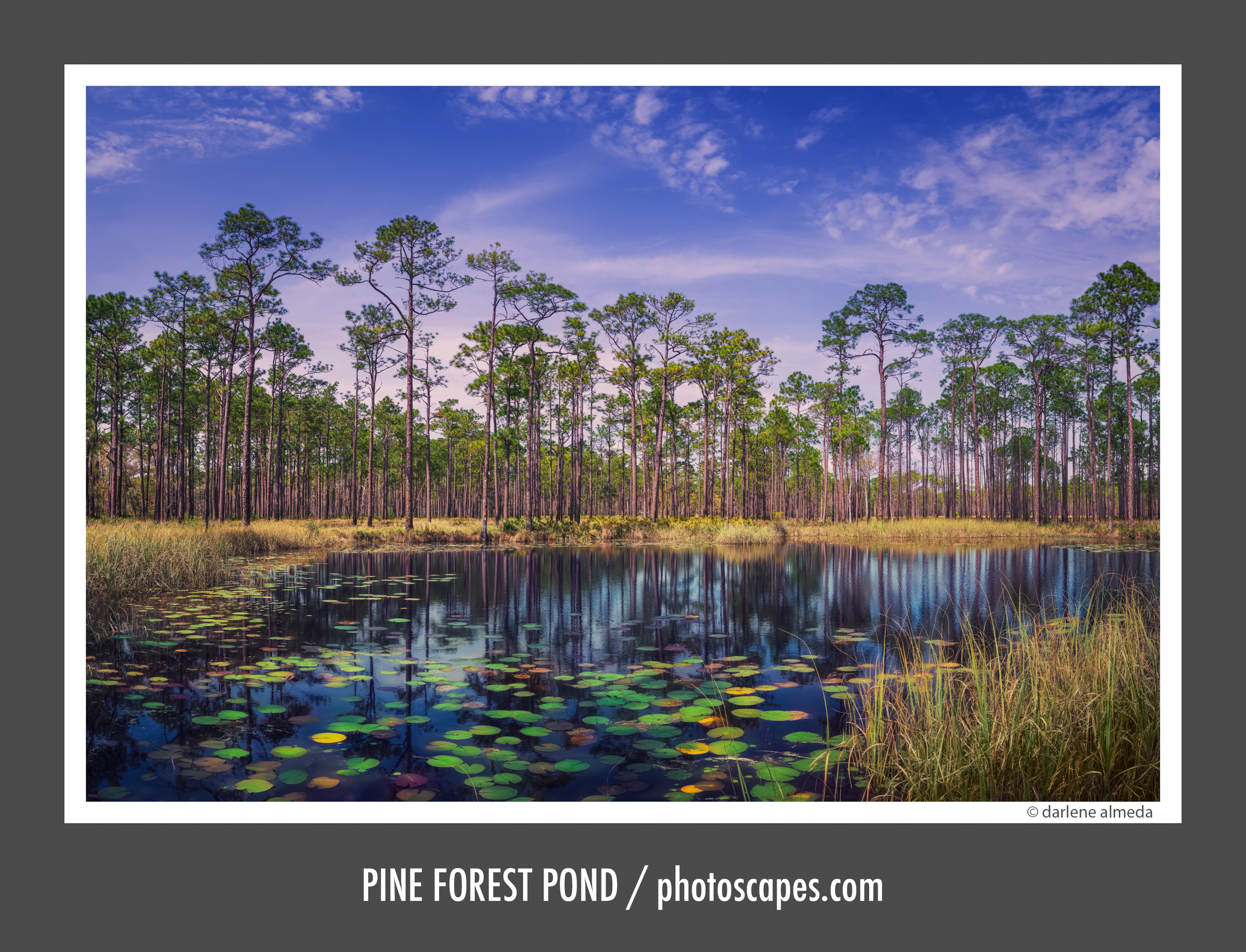
907x Stitching Example: Pine Forest Pond

907X + 45P | 10 IMAGE STITCH

907x Image Gallery

HASSELBLAD DIGITAL BACKS

HASSELBLAD CFV II 50C + 50C SENSOR SIZE + CFV50C

TLDR: CFV II 50c

⚡ TLDR: CFV II 50c
* 50MP CMOS sensor (43.8 × 32.9 mm), 16-bit color, ~14 stops DR
* Mounts to 907x body and all Hasselblad V-series cameras
* Classic A12 film-back styling with modern digital capture
* 3.2" tilting touchscreen LCD, improved UI over original CFV50c
* Internal rechargeable battery + built-in Wi-Fi
* Sensor is the same as the original CFV50c; main changes are UI and screen
* I upgraded only after physical damage to my original CFV50c
* Backup during repair: Phase One P45 (CCD)
* I now keep both CMOS and CCD backs for flexibility and color character

Digital Back: CFV II 50c

Pictured above in the first image is the CFV II 50c mounted on the 907x camera and lens. The CFV II 50c is the updated version of the original CFV50c digital back and features the classic V-system interface for use with the included 907x body and all Hasselblad V-series cameras. Styled after the traditional A12 film back, this digital back centers around a 43.8 × 32.9 mm, 50-megapixel CMOS sensor, producing high-resolution images with approximately 14 stops of dynamic range, 16-bit color depth, and an ISO range of 100–25,600.

The CFV II 50c incorporates a 3.2″ 2.4 million-dot rear tilting touchscreen LCD. The rechargeable lithium-ion battery is now housed internally, resulting in a cleaner overall profile. Built-in Wi-Fi enables wireless remote control and file transfer via Hasselblad Phocus Mobile 2.

The primary differences between the CFV50c and the CFV II 50c are the user interface (UI) and the addition of the rear tilting screen. Photographers who own both backs, as I have, may notice additional UI tools in the CFV II 50c that I do not use in my own workflow. The sensor itself is the same in both models; only the screen, UI, and screen resolution differ. While the II version does offer a higher-resolution display, it was not a compelling enough reason for me to upgrade on its own.

I upgraded from the original CFV50c only after it was damaged and had to be sent to Sweden for a sensor glass replacement. I needed a working digital back for commercial use immediately, and my backup Phase One P45 filled in during that time. However, the color palette of the P45 differs from the Hasselblad CMOS back. When maintaining a client’s website, catalogs, and web graphics, color consistency is critical.

Sweden returned my CFV50c in approximately three to four weeks, and the repair cost was about $2,500. At that point, I chose to sell the original CFV50c. Based on what I had learned using the P45 as a backup, the original back would not see enough use to justify keeping it, and selling the P45 made little economic sense. I prefer having both a CMOS and a CCD digital back available in my equipment cabinet.

TLDR: The 50c Sensor

⚡ TLDR: The 50c Sensor
* 50MP CMOS sensor (43.8 × 32.9 mm)
* ~14 stops of dynamic range
* 16-bit color depth
* ISO range: 100–25,600
* Shared by both CFV 50c and CFV II 50c
* Hasselblad Natural Color Solution for accurate, consistent color

The 50c Sensor

The second image above shows the 50c sensor used in both the CFV 50c and CFV II 50c digital backs. This 43.8 × 32.9 mm, 50-megapixel CMOS sensor delivers high-resolution imagery with approximately 14 stops of dynamic range, 16-bit color depth, and an ISO range of 100–25,600. Hasselblad’s Natural Color Solution provides consistent, realistic color reproduction with smooth tonal transitions.

TLDR: CFV 50c

⚡ TLDR: CFV 50c
* World’s first medium-format CMOS digital back
* Introduced Live View to the Hasselblad V system
* 50MP CMOS sensor (43.8 × 32.9 mm)
* ~14 stops dynamic range, 16-bit color depth
* ISO range: 100–25,600
* My first Hasselblad digital back and first with Live View
* Replaced only due to physical damage and later system changes

Digital Back: CFV 50c

The CFV 50c back is shown in the third image above. It features the world’s first medium-format CMOS sensor, representing a major step forward in digital imaging with the introduction of Live View (LV) to the Hasselblad V system. This breakthrough allowed photographers to achieve modern digital capture while continuing to work with classic V-series cameras using Live View for critical focusing.

Like the CFV II 50c, the CFV 50c uses a 43.8 × 32.9 mm, 50-megapixel CMOS sensor, delivering high-resolution imagery with approximately 14 stops of dynamic range, 16-bit color depth, and an ISO range of 100–25,600.

The CFV 50c was my first Hasselblad digital back and my first to offer Live View. LV alone was a transformative capability at the time, and shortly after its release, Phase One introduced a digital back using the same sensor and LV technology. The CFV 50c was an excellent performer. I ultimately sold mine after it was returned from Sweden with a new protective sensor glass. It served me very well and would likely still be in my kit today had I not needed to replace it.

Images Made with the CFV 50c

TLDR: Focusing Issues with V-Series & Digital Backs

⚡ TLDR: Focusing Issues with V-Series & Digital Backs
* Digital sensors require far more precise focus than film
* Mechanical mirrors and focusing screens can drift out of alignment over time
* Mirror misalignment can cause focus errors at the sensor plane
* Live View bypasses the mirror entirely, allowing direct lens-to-sensor focusing
* Tethered focusing is possible but often limited by legacy port requirements
* Live View digital backs are strongly recommended for reliable, efficient focusing

Focusing Issues with V-Series Cameras & Digital Backs

Using a digital back on vintage mechanical cameras such as Hasselblad V-series bodies introduces unique focusing challenges. Film and digital sensors differ in their tolerance for focus accuracy: film is comparatively forgiving, while digital capture demands far greater precision at the sensor plane.

Because these cameras are fully mechanical, components such as the mirror—which reflects the image to the focusing screen—can drift out of perfect alignment over time. Traditional focusing relies on this mirror-and-screen system, and any misalignment between those components and the sensor plane can result in focusing errors. Mirror shift is one of the most common contributors to this issue.

The introduction of Live View (LV) on digital backs has largely mitigated these problems. LV enables direct focusing between the lens and the sensor itself, bypassing the mirror entirely. Even if the mirror or focusing screen is slightly misaligned, Live View renders that misalignment irrelevant, ensuring precise focus directly at the sensor.

An alternative method is tethered focusing using a computer. However, many modern computers no longer support the legacy ports required by older CCD digital backs. While an older laptop with FireWire or similar connections may solve this, it often introduces workflow inefficiencies.

For these reasons, when budget allows, I strongly recommend choosing a digital back equipped with Live View. It eliminates mirror-alignment uncertainties and provides a far more reliable and efficient focusing workflow.

TLDR: Live View on Hasselblad 500-Series

⚡ TLDR: Live View on Hasselblad 500-Series
* Standard LV use requires Bulb mode, mirror lock-up, and a locking release cable
* Focus is performed directly on the sensor via Live View
* Shutter must be re-cocked using the film winding crank
* Simplest method: use the electronic shutter with T-lock on the 503CX
* Eliminates the need for a cable release and film advance
* Limitations: no motion subjects, no studio strobe use
* Best use case: natural light, travel, and hybrid film/digital workflows

Live View 500 Series Hasselblad: How it Works

To use Live View (LV) with a Hasselblad V-series camera body, follow this basic procedure:

  1. Set the camera to B (Bulb) mode.
  2. Lock the mirror up to allow the sensor to view directly through the lens.
  3. Keep the lens shutter open using a locking shutter release cable.
  4. Frame & focus composition using Live View on the digital back.
  5. Disengage B mode.
  6. Advance the film winding crank to cock the shutter.
  7. Trigger the exposure.

This method allows precise sensor-level focusing but requires mechanical coordination between mirror lock-up, shutter control, and winding.

Simplest Method for Using a Digital Back on a Hasselblad 500 Camera

The simplest and most efficient method I’ve found for using a digital back on my 503CX is to rely on the electronic shutter. By setting the 503CX to T (Time) lock in Bulb mode, I eliminate the need for a locking shutter cable and avoid advancing the film crank altogether.

There are a few limitations to this approach: it is not suitable for subjects in motion, and it cannot be used with strobe lighting in the studio. However, for most natural-light work, this method turns the 503CX into a highly flexible tool for shooting both film and digital within the Hasselblad system. It is especially effective for travel and location work, where speed and simplicity matter.

DIGITAL FLEXBODY

TLDR: Digital FlexBody

⚡ TLDR: Digital FlexBody
* Previously used for film digitizing and macro work with a digital back
* Replaced in 2025 by Sony A7R IVa (61MP) for autofocus-based macro workflows
* Highly capable for landscape use, though now mainly a specialty tool for me
* Rear frame is fixed in square orientation (no portrait-mode tilt with digital back)
* Vertical use requires tripod rotation or L-bracket, converting tilt to swing
* Portrait stitching with a digital back is therefore limited
* With a CFV 100c, square-format shooting offers a practical workaround
* FlexBody operates differently from V bodies: bellows, rear GG, cable release, unique shutter cocking
DIGITAL FLEXBODY: SLICING & STITCHING FILM FOR LARGE PRINT

In the past, I primarily used the FlexBody for digitizing film with a digital back, especially when creating very large files. It also served well for macro-based art images. In 2025, I replaced this workflow with a 61MP Sony A7R IVa, which is better suited to my current macro and digitizing needs due to its excellent autofocus performance. As a result, I no longer use the FlexBody for those purposes.

The one limitation I continue to wish were different is the ability to rotate the rear frame when using a digital back. The rear of the FlexBody, like a 500-series V camera, is fixed in a square orientation. Over the years, photographers have often asked whether the FlexBody offers rear tilt in portrait orientation, and the answer is no. While it is possible to position the FlexBody vertically using a suitable tripod head or an L-bracket, tilt then becomes swing. This becomes a significant limitation for photographers wishing to use the FlexBody with a digital back in portrait orientation for stitched panoramas.

IMPORTANT NOTE: FlexBody ≠ Digital Tech Camera

🗒️ IMPORTANT NOTE: FlexBody ≠ Digital Tech Camera
While the FlexBody can be used with a digital back, it is not recommended as a replacement for a dedicated digital technical camera. Movements are limited when compared to technical camera systems, and once a digital back is installed it cannot be rotated. As a result, images must be made in the horizontal orientation, or the entire FlexBody must be rotated 90 degrees for vertical composition. When rotated, all movements are also rotated, which significantly reduces practical control.

While it is possible to work around this limitation by using a high-megapixel back and using the square crop in Live View, this is not an approach I personally recommend for photographers seeking the flexibility and precision of a true digital technical camera system. This is why I use ALPA technical cameras alongside my Hasseblad gear.

Using a Digital Back with the FlexBody

There are important operational differences between a standard V body and the FlexBody. In addition to the FlexBody functioning as a mini view camera with 22 mm of bellows extension, ±30° image-plane tilt, and ±15 mm of rear shift, it relies on a rear ground glass for viewing and focusing. The FlexBody also lacks a conventional shutter release button; instead, image capture is triggered using a cable release connected to the shutter port.

Another critical difference is the unique method used to cock the lens shutter, which is precisely what makes the FlexBody one of the most efficient Hasselblad V cameras for digital-back operation.

Making a Digital Exposure on the FlexBody

  1. Rotate shutter winding knob clockwise one full turn to open shutter.
  2. Turn Live View on, then compose and focus the image.
  3. Turn Live View off, lightly press cable release to close shutter.
  4. Press the shutter release again to make the exposure.
  5. Return to Step 1 to prepare for the next image.

DIGITAL BACK ACCESSORIES

DIGITAL BACK ACCESSORIES: LOUPE, PELICAN CASE, MEMORY CARDS

Hoodman 3.0 HoodLoupe

If you plan to work in bright, sunny conditions with a digital back, a loupe designed specifically for camera LCD screens is strongly recommended. I’ve used the Hoodman 3.0 HoodLoupe since 2011, beginning with my first digital back, a Phase One P45. Although the P45 did not offer Live View, I still needed clear visibility of the on-screen data for proper operation. That need led me to the HoodLoupe 3.0, which has consistently met my visual requirements when working outdoors in bright light.

The HoodLoupe is constructed from a durable, rubber-like material that does not scratch the screen, and it remains comfortable to use for extended periods. Hoodman now offers an updated version, the HoodLoupe 3.2, with improved optics.

Pelican Case 1150

Depending on the camera system I’m using with my CFV II 50c—either a 503CX or an ALPA technical camera—the digital back must sometimes be transported separately from the 907x. For each setup, I use different protective cases.

When traveling with the 503CX, I use a DIY Tamrac lens case to secure the digital back alongside the camera body and lenses inside a backpack. For location work with my ALPA technical camera system, the digital back is housed in a Pelican 1150 hard case, along with four spare batteries. When traveling with the 907x, the digital back and 907x body are stored together in a Gnass case (now discontinued), similar in form to the Stone Photo Gear 49495 case.

Memory Cards

When selecting memory cards for digital backs, it is best to purchase the fastest and most reliable cards your budget allows. The cards shown above are the ones I currently use with my CFV II 50c. They were the fastest options available when I acquired the back and continue to perform reliably.

be kind